
Table of contents
Introduction
Welcome to this "Getting started with Xelion APIs" guide.
This manual is intended for developers who want to create an integration based on one of the Xelion APIs.
Xelion Phone System is the product name for several components such as the Xelion Server, Xelion Apps, Xelion Park Manager, Xelion Configurator, Xelion CTI etc. As Xelion has multiple components, there are also multiple APIs available which have a relationship with each other and each has its own function.
This manual provides an high-level introduction to the various APIs and what they can be used for.
Please refer to the individual API manuals for the latest API information. To access the API manuals, a Xelion portal account is required. This can be requested via Xelion Support or Xelion Portal.
|
Xelion Server |
Xelion Park Manager |
Xelion Configurator |
Xelion CTI |
|---|---|---|---|
|

|
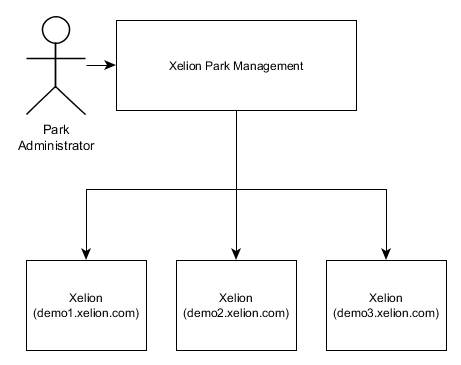
|
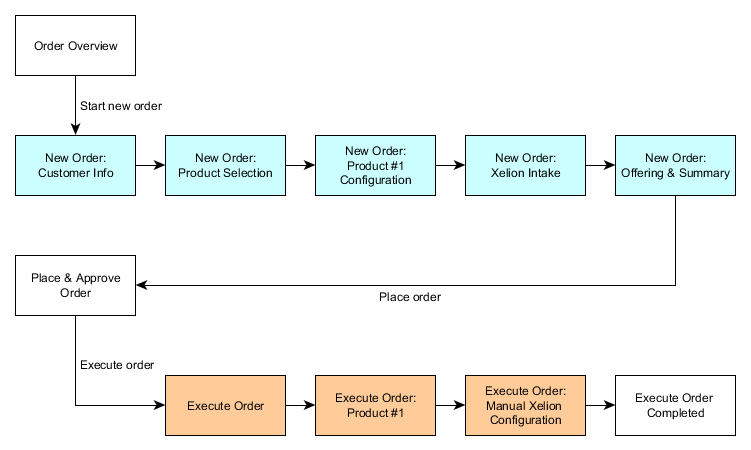
|

|
High-level tenant provisioning
This guide provides an example of the scenario where a new tenant is created via the Xelion Park Manager and is provided with basic configuration. The steps below outline a feasible scenario of various steps to create and configure a full Xelion tenant.
Park Manager
-
Integrator needs to have access to Xelion Park Manager.
-
Integrator creates new tenant providing a name and optionally the number of licences.
-
The tenants can be mapped to an specific organisation within the Park Manager.
Xelion Tenant
-
Change default tenant settings like default call strategy.
-
Create SIP trunks
-
Create users
-
Create Addressable
-
Create user based on addressable
-
Enable Cloud provisioning
-
-
Create phonelines
-
Define main phoneline
-
Map trunk numbers to phoneline
-
-
Set opening hours
-
Create closed phoneline
-
Configure closed phoneline action (eg. audio message)
-
Create phonelines with huntgroup or callqueue
-
Add users to callqueues
-
Create IVR (auto attendant menu)
-
Add phonelines to IVR options
-
Create departments
-
Best-practice during API development
Xelion Phone System is a complex system that contains specific telephony functions. It is advisable to acquire knowledge of how Xelion Phone System works prior to development.
It is required to have access to Xelion Phone System during development. It is also very useful to first create (or have someone create) a desired configuration and then use HTTP GET to read out the configuration so that the Create and Patch operations are easier to understand.
Xelion APIs
Listed below are the relevant APIs along with their purpose and brief description.
Xelion Server
The Xelion server has an API that can be used for mainly 2 tasks:
1.) Server-related tasks (creating a new tenant on a server);
2.) Managing individual tenants (creating new users within a tenant).
Roughly 100 tenants can be created on a Xelion server (often called Multi Tenant or MT).
Each tenant has its own configuration for their PBX.
For the full overview of the Xelion Server API, visit:
https://portal.xelion.com/nl/apidocs/user-guide/overview.html
API Base URL
The link to the Xelion Server API is <https://<host-name>/api/<version>/<tenant>/.>
This URL consists of a number of variables. An explanation is given below:
-
The <host-name> is unique for each server. The Xelion server URL is provided by Xelion, Xelion distributor or Xelion partner. This hostname is always provided with a TLS certificate and cannot be modified without consequences.
-
The <version> indicates the version of the API.
-
The <tenant> is unique per server. If the name of the <tenant> is "master", the server API can be used.
-
There are situations where only the "master" tenant is used on a Xelion Server.
In this case, we call the Xelion server a Single Tenant server (ST).
-
The name of the new Xelion tenant is customisable. For example; "pbx1", "654321", "company".
The name <tenant> cannot be changed without consequences!
There are references to the name of the <tenant> in several ways.
Authentication
To use the API, it is necessary to authenticate via /me/login.
-
The username and password can be obtained via the Xelion partner or the Xelion tenant administrator.
-
The userSpace itentifies the used application and it’s session.
-
The appKey identifies the integrator of the API integration.
AppKey
The AppKey is not mandatory yet, but will be required soon. When using the API without an AppKey, access to API functions will be limited. You can request your AppKey by filling out the form below:
https://zfrmz.eu/WSvAJrh8psKlQv2JG4sA?referrername=gettingstartedwithxelionapis
An example of the JSON payload is:
{
    "userName": "username",
    "password": "password",
    "userSpace": "client-identifier", // For example "Contact Sync 1.0.3"
    "appKey": "integrator-app-key" // For Example ABCA6Jnzw8tFaacte9KEJvcqY3gkGxyz
}
An example of a curl command:
(Depending on your operating system, the syntax may need to be adjusted).
curl 'https://<host-name>/api/<version>/<tenant>/me/login' --header 'Content-Type: application/json' --data '{
    "userName": "username",
    "password": "password",
    "userSpace": "client-identifier",
    "appKey": "integrator-app-key"
}'
An example of the JSON response is:
{
    "authentication": "5944594058c3bdfb4b04d5c9db30g5113b9be4c9b2e0ae5734c6f99ac8",
    "renewalToken": "asdf77594456f99ac8",
    "validUntil": "2025-05-07 11:08:51",
    "version": "1.1",
    "serverVersion": "9 update 3 patch 1",
    "buildNumber": "20250501.1"
}
For more info, see: https://portal.xelion.com/nl/apidocs/user-guide/resources/me_login.html
After the authentication token is obtained, other API calls can be used.
The session token remains valid until it is expired or revoked. The token’s expiration date is included in the JSON login response. The client app must renew the token by invoking renew or by logging in again to the server.
API Manual
For the latest version of the full API user guide, check out the page below:
API manual: https://portal.xelion.com/nl/apidocs/user-guide
API Beta manual: https://portal.xelion.com/nl/betadocs/user-guide
For future changes to the API, check out the change log of the BETA API User Guide!
Postman Collection
A Postman Collection is available containing the most commonly used API call examples.
This can be requested via Xelion Support at support@xelion.com
Xelion Park Manager
The Park Manager is a tool for managing Xelion servers and tenants. Through the Park Manager, users can access an organisation that has access to one or more servers and tenants.
The Park Manager can be used to automate an entire Xelion server park and include it in an integrated provisioning system or order portal.
Based on the user's rights, the Park Manager can be used, for example;
-
Adding servers
-
Creating organisations
-
Creating users
-
Creating tenants
-
Starting/stopping tenants
-
Logging into servers
-
Creating tenants
-
-
Login to tenants
-
Create/manage trunks
-
Create/manage users
-
Create/manage phone extensions
-
Create/manage phones
-
...and a whole lot more.
-
Architecture
A Park Manager is a server (service) that has its own API.
Each Park Manager has its own unique URL and associated Base API.
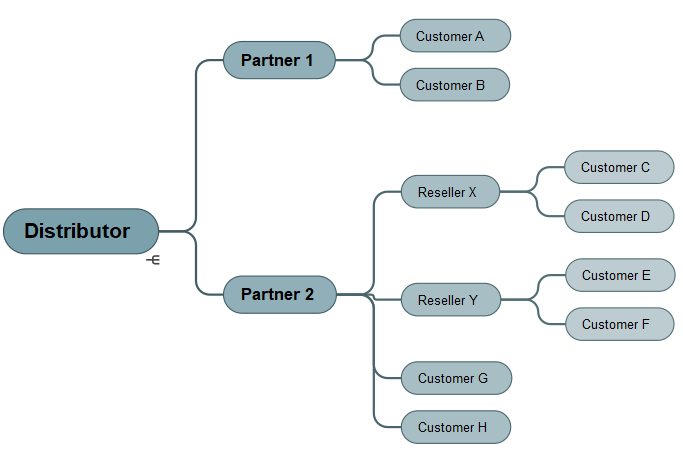
The Park Manager consists of a multi-layer model where multiple organisations can be created per Park Manager. Based on the organisation, the user has access to that organisation's resources such as servers, tenants, (sub-)organisation and users.
Below is an example of the multilayer structure and relationship between different organisations:
API Base URL
Each Park Manager has its own unique base url:
https://<park-manager-url>/api/<version>/
A public example of a Park Manager is:
-
https://parkorder.xelion.com/api/ (Base API URL)
-
https://parkorder.xelion.com/api/docs/swagger-ui/index.html (API Manual)
API version
Note that different versions of the API may need to be used mixed up:
-
POST /api/v1/park/start-new-tenant (For example, is a v1 call)
-
POST /api/v2/tenants/{id}/login (For example, is a v2 call)
For an up-to-date overview of all available API calls, please refer to the API manual.
Authenticatie
To use the Park Manager API, an X-Auth-Key token must be used which can be generated per Park Manager user. Below is an example of an API call using the curl command and its parameters:
curl -X 'POST' \
  'https://<park-manager-url>/api/v1/park/start-new-tenant?name=<mytenant>' \
  -H 'accept: application/json' \
  -H 'X-Auth-Key: <x-auth-key>'
The URL consists of a number of variables. An explanation is given below:
-
The <park-manager-url> is the URL to the Park Manager provided.
-
<mytenant> in this example is the name of the new tenant to be started.
-
<x-auth-key> is a token made available via the Park Manager user.
One or more X-Auth-Key API tokens can be created per user.
It is recommended to create your own Park Manager user and API token for each integration.
API manual
The OpenAPI manual can be found via:
A public example of the Park Manager OpenAPI manual can be found via:
Xelion Configurator
The Xelion Configurator can be used to automatically create new Xelion tenants on an existing Xelion Serverpark.
The Xelion Configurator cannot be used to modify existing configurations.
Getting Started
A very comprehensive manual is available at https://orderconfigurator.xelion.com/
For more information, see the Configurator documentation at https://orderconfigurator.xelion.com
Architecture
The Configurator consists of five parts:
User interface
A graphical user interface makes it easy to create new tenants:
https://orderconfigurator.xelion.com/example.html
Intake
Using the intake, JSON-based complete configurations can be prepared which can be sent to Provisioning. The intake could be integrated via a provisioning system, making it possible to create new tenants quickly and easily.
https://orderconfigurator.xelion.com/getting-started-intake.html
Provisioning Service
This allows the prepared JSON to be provisioned.
https://orderconfigurator.xelion.com/provisioning.html
Portfolio manager
Allows adjustment of Configurator settings.
https://orderconfigurator.xelion.com/getting-started-portfolio.html
Management interface
The order status can be viewed via this (graphical) interface.
https://orderconfigurator.xelion.com/admin
API Base URL
URL to the API is:
-
https://<configurator-api-url>/api/v1/
The <configurator-api-url> is the URL to the Configurator.
A publicly accessible URL is:
A publicly accessible link to the Beta version is:
Authenticatie
Using the Configurator requires an authentication token. This can be requested via support@xelion.com or via your distributor. After receipt, the API key must be linked to an organisation in the Xelion Park Manager. Without linking to the Park Manager, no tenants can be created on a Xelion Serverpark.
Below is an example of an API call using the curl command and its parameters and headers:
curl -X 'POST' \
  'https://<configurator-api-url>/api/v1/organizations/1/' \
  -H 'accept: application/json' \
  -H 'X-Auth-Key: <x-auth-key>'
API manual
The OpenAPI manual can be found at:
-
https://<confirurator-url>/api/v1/docs/swagger-ui/index.html
The <configurator-url> the link to the Configurator is.
A public example of the Configurator API manual can be found at:
The beta version of the Configurator API manual can be found at:
Xelion CTI
Xelion CTI is a service for integrating a Xelion server with other APIs that need to be accessed via OAuth 2.0 authentication such as for third-party CRM systems including Salesforce and Zoho.
Only in case OAuth 2.0 is required is it relevant to use the Xelion CTI service.
API Manual
For more information, check out the documentation via the link below:
https://portal.xelion.com/nl/apidocs/xelion-cti/user-guide/index.html
Examples
Below are some possible examples of what could be made based on the various APIs.
All the examples together make the configuration and adjustments below:
-
New Xelion tenant "Company".
-
New user "Mark van Dam" on this new tenant.
-
New telephone extension (Phoneline) "Sales" with internal number "333".
-
Link user "Mark van Dam" to the "Sales" phoneline.
-
Rename the extension "Sales" to "External forward to +31612345678" and forward to "+31612345678".
Unnecessary or empty parameters in both Requests and Responses may be omitted in the examples below so that this page does not become endlessly long.
Start new Xelion tenant via Park Manager API
URL
POST <https://<PM-URL>/api/v1/park/start-new-tenant>
Request
curl -X 'POST' \
  'https://<PM-URL>/api/v1/park/start-new-tenant?name=<TENANT>&requestedLicenses=42&label=<LABEL>' \
  -H 'X-Auth-Key: <X-AUTH-KEY>'
Response
{
  "response": {},
  "server": {
    "id": 1,
    "name": "<TENANT>",
    "scheme": "https",
    "fqdn": "parkmanager.xelion.com",
    "version": "v8u2p2"
  },
  "tenant": {
    "id": 1,
    "databaseId": 0,
    "subDatabaseName": "string",
    "label": "string",
    "resellerName": "string",
    "active": true,
    "status": "UNKNOWN",
    "licenses": [
      {
        "id": 0,
        "tenant": "string",
        "name": "string",
        "maxLicenses": 0,
        "usedLicenses": 0
      }
    ],
    "usage": {
      "db": 0,
      "moh": 0,
      "monitor": 0,
      "callRecording": 0,
      "voicemail": 0,
      "chatAttachment": 0,
      "mailAttachment": 0,
      "totalAttachment": 0,
      "total": 0
    },
    "reservationTimeStamp": "2023-07-10T13:14:31.763Z",
    "version": "string",
    "url": "string",
    "server": 0,
    "owner": 0
  }
}
Creating API session on Xelion Tenant via Park Manager API
URL
POST https://<PARK-MANAGER-URL/api/v2/tenants/<ID>/login
Request
curl -X 'POST' \
  'https://parkorder.xelion.com/api/v2/tenants/1/login' \
  -H 'accept: application/json' \
  -H 'X-As-Organization: 2' \
  -H 'X-Auth-Key: <X-AUTH-KEY>' \
Response
{
  "authentication": "<TOKEN>",
  "renewalToken": "<TOKEN>",
  "validUntil": "2023-07-10T13:22:43.414Z",
  "version": "string",
  "serverVersion": "string",
  "brand": "string",
  "buildNumber": "string",
  "host": "string",
  "tenant": "string",
  "userName": "string"
}
Create Trunk on Xelion Tenant via Xelion API
URL
POST https://<XELION_SERVER-URL>/api/v1/<TENANT>/users/
Request
{
    "providerName": "SipTrunk",
    "host": "sip.trunk.com",
    "account": "<ACCOUNT>",
    "password": "<PASSWORD>",
    "assignedNumbers": [
      {
        "extension": {
          "address": "+31123456789"
        },
        "useAsCallerId": true,
        "orderNumber": 1
      }
    ],
    "useAsFallback": true,
    "supportsSenderId": true,
    "useDiversionHeader": true,
    "defaultNormalization": "plusPrefix",
    "commonName": "SipTrunk",
    "objectType": "XCCTrunk"
}
In this API call, Authorisation must be added to the HTTP header such as:
--header 'Authorization: xelion <authentication>'
Response
{
    "object": {
        "providerName": "<TENANT>_SipTrunk",
        "host": "sip.trunk.com",
        "port": "",
        "account": "<ACCOUNT>",
        "authenticationAccount": "<AUTHENTICATIONACCOUNT>",
        "password": "<PASSWORD>",
        "outboundProxy": "",
        "outboundPort": "",
        "dontRegisterWithServer": false,
        "serverNet": "",
        "gateway": "",
        "assignedNumbers": [
            {
                "extension": {
                    "commonName": "+31123456789",
                    "addressType": "Telephone",
                    "address": "+31123456789",
                    "label": "",
                    "orderNumber": 0,
                    "oid": "2730376",
                    "objectType": "TelecomAddress"
                },
                "useAsCallerId": true,
                "orderNumber": 1,
                "oid": "2730377",
                "objectType": "XCCTrunkExtension"
            }
        ],
        "acceptUnknownNumbers": false,
        "allowPeerToPeer": false,
        "useAsFallback": true,
        "supportsSenderId": true,
        "supportsRedirect": false,
        "supportsAnonymous": false,
        "alwaysAnonymous": false,
        "anonymousCallerName": "",
        "anonymousCallerId": "",
        "useAssertedIdentity": false,
        "usePreferredIdentity": false,
        "useDefaultCallerNrAsIdentity": false,
        "useDiversionHeader": true,
        "keepAlive": false,
        "registrationTimeOut": 0,
        "dialPrefixes": [],
        "defaultNormalization": "plusPrefix",
        "numberMapping": [],
        "registrationStatus": "",
        "registrationDate": "",
        "rejectedRegistrationCause": "",
        "customSIPOptions": "",
        "snmpId": 0,
        "permissions": "ReadWriteRemove",
        "commonName": "<TENANT>_SipTrunk",
        "oid": "2730369",
        "objectType": "XCCTrunk"
    }
}
Create Addressable on Xelion Tenant via Xelion API
URL
POST https://<XELION_SERVER-URL>/api/v1/<TENANT>/addressables
Request
{
    "objectType":"Person",
    "commonName":"Mark van Dam"
}
In this API call, Authorisation must be added to the HTTP header such as:
--header 'Authorization: xelion <authentication>'
Response
{
    "object": {
        "initials": "M.",
        "givenName": "Mark",
        "familyName": "Mark",
        "communicationLanguage": "natDutch",
        "permissions": "ReadWriteRemove",
        "commonName": "Mark van Dam",
        "accessRights": "readWrite",
        "oid": "2730162",
        "objectType": "Person"
    }
}
The "oid" must be used in the next call while creating the User.
Create User on Xelion Tenant via Xelion API
URL
POST https://<XELION_SERVER-URL>/api/v1/<TENANT>
Request
{
    "userName": "<USERNAME>",
    "password": "<PASSWORD>",
    "active": true,
    "xccRole": "user",
    "person": {
      "oid": "<OID>",
      "objectType": "Person"
    },
    "userLicense": true,
    "commonName": "Mark van Dam",
    "objectType": "UserProfile"
}
Response
{
    "object": {
        "userName": "username",
        "active": true,
        "xccRole": "user",
        "primaryLine": {
            "users": [
                {
                    "user": {
                        "person": {
                            "permissions": "ReadWriteRemove",
                            "commonName": "Mark van Dam",
                            "oid": "2730162",
                            "objectType": "Person"
                        },
                        "commonName": "Mark van Dam",
                        "oid": "2730256",
                        "objectType": "UserProfile"
                    },
                    "lineOrder": 1,
                    "skillNumber": 0,
                    "incoming": true,
                    "outgoing": true,
                    "editable": "OUTGOING",
                    "oid": "2730288",
                    "objectType": "XCCConnectedUser"
                }
            ],
            "lineHuntingTimeout": 0,
            "ringLastTalkedToFirst": false,
            "associatedAddressable": {
                "permissions": "ReadWriteRemove",
                "commonName": "Mark van Dam",
                "oid": "2730162",
                "objectType": "Person"
            },
            "autoAttendantOn": false,
            "userPhoneLine": {
                "doNotDisturb": false,
                "anonymous": false,
                "redirectionActive": false,
                "redirectionTimeout": 0,
                "fallbackActive": false,
                "voicemailActive": false,
                "permissions": "ReadWriteRemove",
                "commonName": "",
                "oid": "2730273",
                "objectType": "XCCUserPhoneLine"
            },
            "hideInPhoneList": false,
            "showWaitingQueue": false,
            "processQueueInOrder": false,
            "saveCallRecording": false,
            "doNotRecordInternalCalls": false,
            "limitAccessToCallRecording": false,
            "enableVoicemailToEmail": false,
            "voicemailDeliveryNumber": "",
            "enableVoicemailDelivery": false,
            "voicemailDeliveryTimeout": 0,
            "unlimitedChannelCount": false,
            "announcementEnabled": false,
            "callerAnnouncementEnabled": false,
            "hideNumbers": false,
            "enableVoicemailSms": false,
            "isConferenceRoom": false,
            "conferenceRoomCallerId": "",
            "conferenceRoomListenOnly": false,
            "manualWrapUp": false,
            "connectFirstAvailable": false,
            "onlyExternalCalls": false,
            "agentShowInbound": false,
            "agentShowOutbound": false,
            "agentShowTotal": false,
            "agentShowChatStats": false,
            "callLogUsers": [
                {
                    "permissions": "ReadWriteRemove",
                    "commonName": "Mark van Dam",
                    "oid": "2730256",
                    "objectType": "UserProfile"
                }
            ],
            "permissions": "ReadWriteRemove",
            "commonName": "Mark van Dam",
            "oid": "2730266",
            "objectType": "XCCPhoneLine"
        },
        "person": {
            "permissions": "ReadWriteRemove",
            "commonName": "Mark van Dam",
            "oid": "2730162",
            "objectType": "Person"
        },
        "locale": {
            "permissions": "ReadWriteRemove",
            "commonName": "Nederlands",
            "oid": "1001310",
            "objectType": "Locale"
        },
        "userLicense": true,
        "phones": [
            {
                "permissions": "ReadWriteRemove",
                "commonName": "Mark van Dam (Softphone)",
                "oid": "2730275",
                "objectType": "XCCPhone"
            }
        ],
        "lines": [
            {
                "line": {
                    "commonName": "Mark van Dam",
                    "oid": "2730266",
                    "objectType": "XCCPhoneLine"
                },
                "orderNumber": 1,
                "skillNumber": 0,
                "incoming": true,
                "outgoing": true,
                "editable": "OUTGOING",
                "oid": "2730288",
                "objectType": "XCCConnectedUser"
            }
        ],
        "cloudProvisioningEnabled": false,
        "preferences": {
            "wallboards": [],
            "permissions": "ReadWriteRemove",
            "commonName": "username",
            "oid": "2730258",
            "objectType": "UserPreferences"
        },
        "loginFailures": 0,
        "permissions": "ReadWriteRemove",
        "commonName": "Mark van Dam",
        "oid": "2730256",
        "objectType": "UserProfile"
    }
}
Create Phoneline on Xelion Tenant via Xelion API
URL
POST https://<XELION_SERVER-URL>/api/v1/<TENANT>/phonelines/
Request
{
    "externalNumber": "0123456789",
    "callerName": "Sales",
    "extensions": [
      {
        "address": "333",
        "objectType": "TelecomAddress"
      }
    ],
    "commonName": "Sales",
    "objectType": "XCCPhoneLine",
    "changeType": "Created"
}
Response
{
    "object": {
        "externalNumber": "0123456789",
        "allowedNumbers": [],
        "callerName": "Sales",
        "extensions": [
            {
                "commonName": "333",
                "addressType": "Telephone",
                "address": "333",
                "label": "",
                "orderNumber": 1,
                "oid": "2730367",
                "objectType": "TelecomAddress"
            }
        ],
        "users": [],
        "phones": [],
        "lineHuntingTimeout": 0,
        "ringLastTalkedToFirst": false,
        "autoAttendantOn": false,
        "hideInPhoneList": false,
        "showWaitingQueue": false,
        "processQueueInOrder": false,
        "maxQueueLength": 0,
        "callQueueWrapupTime": 0,
        "saveCallRecording": false,
        "doNotRecordInternalCalls": false,
        "managers": [],
        "limitAccessToCallRecording": false,
        "callRecordingUsers": [],
        "enableVoicemailToEmail": false,
        "voicemailDeliveryNumber": "",
        "enableVoicemailDelivery": false,
        "voicemailDeliveryTimeout": 0,
        "unlimitedChannelCount": false,
        "announcementEnabled": false,
        "callerAnnouncementEnabled": false,
        "hideNumbers": false,
        "isChatable": false,
        "groupChatActive": false,
        "chatHuntingTimeout": 0,
        "chatIdleTimeout": 0,
        "chatEndedTimeout": 0,
        "chatHeartbeatInterval": 0,
        "chatHeartbeatMessage": "",
        "chatNoAgentsAvailableMessage": "",
        "enableVoicemailSms": false,
        "isConferenceRoom": false,
        "conferenceRoomCallerId": "",
        "conferenceRoomListenOnly": false,
        "manualWrapUp": false,
        "connectFirstAvailable": false,
        "forwardCallerIdMap": [],
        "positionReportTime": 0,
        "wallboardResetTime": "",
        "onlyExternalCalls": false,
        "missedCallThreshold": 0,
        "durationThresholdMin": 0,
        "durationThreshold": 0,
        "agentShowInbound": false,
        "agentShowOutbound": false,
        "agentShowTotal": false,
        "agentShowChatStats": false,
        "wallboardEntries": [],
        "callLogUsers": [],
        "trafficClasses": [],
        "afterCallTypes": [],
        "additionalVoicemailEmailText": "",
        "unreadRecentContactsCount": 0,
        "activeTodoListItemsCount": 0,
        "minNumberOfActiveUsersInLine": 0,
        "permissions": "ReadWriteRemove",
        "commonName": "Sales (2)",
        "oid": "2730347",
        "objectType": "XCCPhoneLine"
    }
}
The "oid" must be used in the next call while to update the Phoneline.
Add user to Phoneline op Tenant via Xelion API
URL
PATCH https://<XELION_SERVER-URL>/api/v1/<TENANT>/phonelines/2730347'
Request
{
    "operations": [
        {
            "op": "add",
            "path": "/users/1",
            "value": "2730256"
        }
    ]
}
Response
1
"1" indicates the update succeeded with no errors.
Update Phoneline op Tenant via Xelion API
URL
PATCH https://<XELION_SERVER-URL>/api/v1/<TENANT>/phonelines/2730347'
Request
This call updates the extension name and transfers it to an external 06 number.
{
    "operations": [
        {
            "op": "replace",
            "path": "/commonName",
            "value": "External forward to 0612345678"
        },
        {
            "op": "replace",
            "path": "/callerName",
            "value": "External forward to 0612345678"
        },
        {
            "op": "replace",
            "path": "/userPhoneLine/redirectionActive",
            "value": true
        },
        {
            "op": "replace",
            "path": "/userPhoneLine/redirection",
            "value": "0612345678"
        }
    ]
}
Response
1
"1" indicates the update succeeded with no errors.